Grow a Garden 2: All Best Working Megaphone Sound ID Codes (Roblox)
Grow a Garden 2: All Working Megaphone Sound ID Codes
Grow a Garden 2 (Roblox) is already a great time on its own — farming, growing crops, and defending your garden from people trying to steal your stuff. But the Megaphone takes the whole experience to another level. Whether you want to vibe out with good music while you tend to your plants, absolutely blast your friends with the loudest sound effects in the game, or scare off anyone dumb enough to try and steal from your garden, the Megaphone is the tool for it. The only problem is that rolling random sounds on it gets boring fast, and you end up with the same few tracks on repeat. That is where Sound ID codes come in.
Sound IDs let you put any specific song or sound effect you want directly into your Megaphone instead of leaving it up to random chance. We have put together a full list of every working Sound ID code right now — over 30 of them, including bangers, memes, loud ones for chaos, and some genuinely good music for when you just want to chill in your garden. Here is everything you need.
All Working Grow a Garden 2 Megaphone Sound ID Codes
Every code in this table has been tested and confirmed to work as of June 2026. We keep this list updated, so bookmark this page and check back whenever you need fresh codes.
| Sound ID Code | Sound |
|---|---|
| 109829522404772 | Skibidi Toilet |
| 142376088 | Raining Tacos |
| 4883181281 | Michael Jackson’s Smooth Criminal |
| 140736374485942 | Brainrot Meme |
| 97699114114271 | Steal a Brainrot |
| 138118304933431 | Brainrot Phonk: Tralalero Tralala |
| 140055886382926 | Frog Laughing Meme (LOUD) |
| 6070263388 | Gangsta’s Paradise |
| 2547598538 | Gucci Gang |
| 1000123073 | Money Money Money |
| 130783046 | Godzilla Roar (LOUD) |
| 7816195044 | Troll Laugh (LOUD) |
| 80999666411874 | Congratulations |
| 124769473122070 | Grow a Garden Notification |
| 130802578468469 | Foghorn |
| 93896046549901 | Tekken You Win |
| 152381839 | Pokerap |
| 131799297373079 | Your Computer Has A Virus |
| 130767090 | Who’s That Pokemon? |
| 9045934037 | The Night Sky |
| 1836280076 | Ode to Joy |
| 1846368080 | Stadium Rave |
| 139002442908771 | Wow Clap (LOUD) |
| 1840675989 | Approaching Menace |
| 1843536434 | Trumpet Concerto in E Flat Major |
| 1842150470 | Hungarian Dance |
| 1846088038 | Morning Mood |
| 1838457617 | Claire De Lune |
| 1836009208 | Classic Easter |
| 168208965 | Whatcha Say Who |
| 131603357 | Intergalactic |
| 6932519682 | Fortnite Death Sound |
| 3732358952 | Minecraft Villager Death Sound |
| 1626996526 | Windows XP Theme |
Our Personal Picks From The List
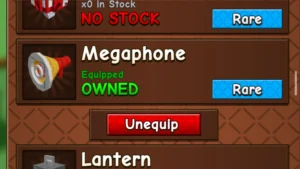
If you do not want to scroll through the whole table and just want to know what actually slaps, here are the ones worth trying first. Gangsta’s Paradise and Smooth Criminal are genuinely good listens while farming. The Godzilla Roar and Troll Laugh are perfect for scaring people away from your crops, and both are loud enough to get the job done immediately. The Windows XP Theme and Minecraft Villager Death Sound are guaranteed to get a reaction from anyone nearby. And if you want something calming while you grind, Claire De Lune and Morning Mood are surprisingly good background music for a Roblox farming game.
How To Use Sound ID Codes In Grow a Garden 2
Using these codes is straightforward once you know where to look. Here is the exact step-by-step process:
Step 1 — Launch Grow a Garden 2 on Roblox.
Step 2 — Open your backpack and equip the Megaphone by selecting it once.
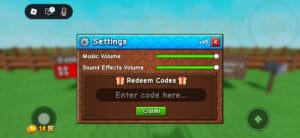
Step 3 — Press the Settings button on the left side of your screen — it is the large grey cog icon, hard to miss.
Step 4 — A field will appear where you can paste your Sound ID. Copy the code from the table above and paste it directly into that field.
Step 5 — Click anywhere on the screen to save the track.
Step 6 — Close the menu and tap to play your chosen music or sound effect.
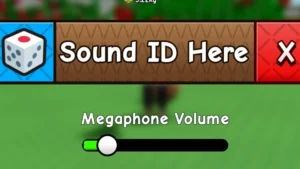
One thing worth knowing — the volume control that appears below the Sound ID input box inside the gear settings is currently bugged and does not work properly. If you want to adjust the Megaphone volume, use the general settings in the game instead. This is a known issue and will hopefully be patched in a future update.
How To Find More Sound ID Codes
The codes in this list are updated regularly, so bookmarking this page is the easiest way to always have access to the latest working Sound IDs. Roblox Sound IDs do occasionally get taken down or stop working as the platform updates, so we check and refresh this list whenever that happens.
If you want to find codes on your own outside of this list, the dice icon in the Megaphone settings generates random tracks while you are in-game. Most of them are short one-liners and custom sounds rather than full songs, but it is worth rolling a few times if you want something unexpected. The community Discord servers for Grow a Garden 2 are also a good source for new codes as players share discoveries there regularly.
Final Tips
A couple of things to keep in mind before you start blasting sounds across the server. The loud ones — Godzilla Roar, Troll Laugh, Frog Laughing Meme, Wow Clap — are genuinely loud and will absolutely be heard across the map. Use them with that in mind. If you are playing on a private server with friends, go absolutely wild. If you are on a public server, maybe save the loud ones for when someone tries to steal your crops — nothing discourages a thief quite like a sudden Godzilla roar from across the garden. Timing is everything with the loud ones, and using them at the right moment is half the fun.
The music codes on this list are genuinely worth exploring beyond just the ones we highlighted as personal picks. Every player is going to have a different experience with the Megaphone depending on what they are actually trying to do with it. If you are in a grinding session working through a long farming run, something like Claire De Lune or Morning Mood in the background turns a repetitive task into something almost meditative. If you are playing with a group of friends and the energy is already chaotic, stacking the Troll Laugh back to back every time someone tries to steal from you becomes its own running joke that makes sessions genuinely memorable. The Megaphone is not just a gameplay tool — it is a social one, and the best uses of it are the ones that come from reading the room and picking the right sound for the right moment.
It is also worth knowing that the Sound ID system in Grow a Garden 2 goes far beyond the codes on this list. The numbers we have compiled here are tested and confirmed to work, but they represent a fraction of what is actually available. Roblox Sound IDs pull from an enormous library of user-uploaded audio,o and there are literally thousands of options out there that do not appear on any guide because most players have not discovered them yet. The dice icon in the Megaphone settings is actually a great way to stumble across something unexpected — roll it a few times in a session, and you will occasionally land on something genuinely funny or unexpectedly perfect for the moment. Some of the best Megaphone moments come from random rolls rather than planned codes.
One thing that trips up a lot of players with the Megaphone is the volume bug mentioned earlier in this guide. Just to reiterate — the volume slider inside the gear settings for the Megaphone is currently not functioning correctly. If you find that your Sound ID is playing but you cannot get the volume to adjust properly through that menu, go to the main game settings instead and adjust the overall sound levels from there. It is a workaround rather than a fix, but it does the job until HoYoverse pushes a patch that addresses it. We will update this guide the moment the volume control is confirmed fixed in a future update.
We will keep this list updated with every new working Sound ID as they are confirmed. New codes get discovered by the community regularly — especially after major game updates when new audio gets added to the Roblox lib, rarely, and players start finding IDs that work with the Megaphone system. If you find a code that is not on this list and want to share it, re it drop it in the comments below, and we will test it and add it if it works. The best guides are the ones built with community input, and this is one of those cases where you probably know something we do not. Check back regularly after updates and bookmark this page so you always have access to the most current version of the list.
PLAY NOW:

Hello! I am Mr. Sano Ethan, a content creator, variety gamer, and the driving force behind Kick Of Draft. With over 6 years of hands-on experience across PC, console, and indie gaming,
Submit your review | |